Type a sentence, get a gig-ready,
multi-scene preset on your Fractal FM9 in minutes: the signal chain wired, amps
voiced per scene, cabs chosen, scenes named on the footswitches. Or plug in a
BOSS IR-2 and ask it for a brown sound: it picks the voicing, sets the knobs,
and can load your own cabinet IRs onto the pedal. You read the exact list of
changes, you confirm, and only then do they land on the hardware over USB MIDI,
verified by reading the unit back. A language model proposes; it never sends.
Nothing reaches your amp until you say go.
Live from a connected FM9. Nothing on this page is a mock-up.
331amps, searchable by the real gear they model
2,237cabs, by name and by what the cab actually is
8scenes per preset, named on your footswitches
Every writeverified by reading the unit back
Your AIChatGPT, Gemini, Grok, DeepSeek, Kimi, local, or the Claude CLI
01 · WATCH IT HAPPEN
Watch it happen
Two videos, both real, both on a real FM9.
▶ THE WALKTHROUGH: building a Soldano SLO-100 inspired rig
One sentence, "build me a Soldano SLO-100 inspired rig", and ToneCommand builds
seven complete scenes around one of the most legendary high-gain amps ever made:
crunch and rhythm through high-gain brutality to a singing SLO-style lead. It
plans the signal chain, voices every scene, and shows you exactly what it will
do. You confirm. It builds. Then you play. On a real FM9, scene by scene.
▶ THE PLAYTHROUGH: every scene of a finished preset, played on the FM9
All eight scenes of a drop C metalcore preset, every one of them built by typing
a sentence, played straight through on the hardware. Proof, not screenshots.
Bring your own AI: pick ChatGPT, Gemini, Grok, DeepSeek, Kimi, a subscription
you already pay for, or a model on your own laptop by name in the settings
panel, or use the Claude CLI it finds on its own. ToneCommand translates,
verifies against the real unit, and keeps every write behind your
confirmation (docs/AI-BACKENDS.md).
02 · FEATURES
Features
Everything ToneCommand does, and the words that make it happen. Every prompt
below is a real request you can type.
Build a whole rig from one sentence
A complete multi-scene preset from a single prompt: the signal chain wired,
an amp voiced per scene role, a cab chosen, drives and effects placed, and
the scenes named on your footswitches.
"Build a modern metalcore preset in drop C: a big ambient clean, a tight
chug rhythm, a lead that sings over the mix, and a heavier breakdown."
One tap on + Create drops a blank rig on a free slot (or clears the loaded
buffer on a full unit) so you always have a clean canvas to build on.
Open-ended ask? It asks a couple of quick questions first (era, how many
scenes, how heavy). Specific ask? It just builds.
The eight-scene grid fills in live as you talk it through, so you catch a gap
("nothing in scene 8 yet") before it is built.
A tone rulebook rides on every build: cleans come out loud, leads
out-saturate the rhythm, no scene ships silent. That balance was dialed in by
ear on real hardware, so a cold build lands close on the first try.
Build a tone from a video you do not have time to watch
Paste a YouTube link to somebody's rig rundown and get a plan against your own
FM9 without watching it. When the video has captions (nearly all do, whether
the creator published them or YouTube auto-generated them) it reads the whole
transcript and pulls out only the parts that matter in about twenty seconds:
the intro, the sponsor read, the merch plug and every tangent are thrown out,
and a two-hour walkthrough becomes a compact tone spec.
"build the rhythm tone from this rig rundown: youtube.com/watch?v=..."
No captions? It transcribes the audio locally, on your machine, in a few
minutes (up to about ninety minutes of runtime; past that it asks you to paste
the part that matters).
A forum thread or a pasted chat about someone's tone works the same way: drop
in a URL or the text of the conversation and it does the same read-and-extract.
It marks which numbers the source actually stated and which it chose, so a
guess never wears the source's authority. Ballpark to review and tweak, not a
clone, and a build from someone else's video never stores to a slot on its own.
Voice it in plain language
"a Klon into a JCM800 with a greenback 4x12" "tighten the gate for drop C and bump the presence slightly" "make scene 1 a dry crunch rhythm and keep the wets in scene 2"
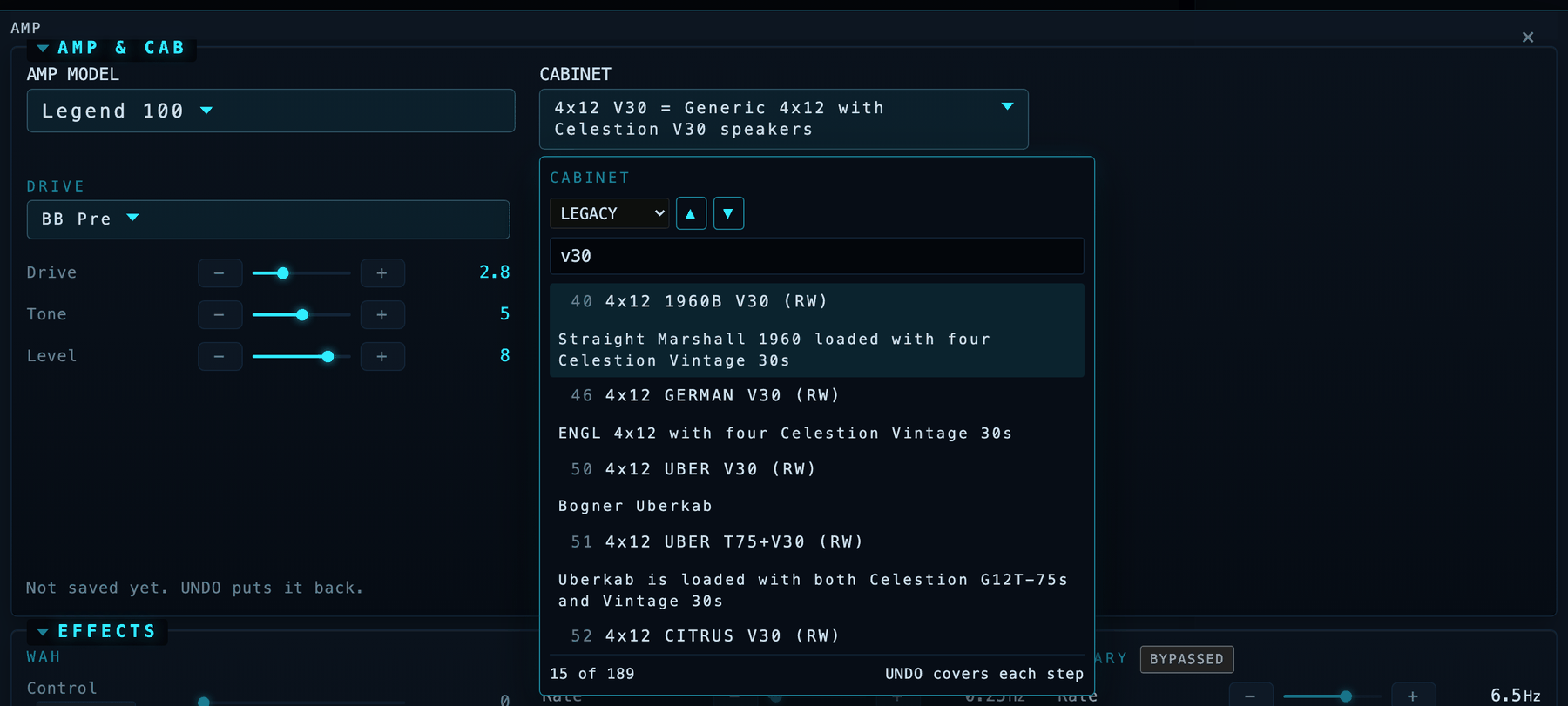
Pick a cabinet by name, not by scrolling thousands of IRs: "put a 4x12 V30 on
the rhythm channel."
Per-block manual controls with -/+ fine-tune on every slider, a graphic EQ
that looks like one, and 331 amps searchable by the real gear they model.
Borrow tone from the tones you already own
Lift an effect off another preset, aligned scene-for-scene, not just channel
for channel: "make my delay like BT Steve Lukather's."
Compose a preset from parts of several artists' tones:
"clone BT Marco Sfogli into slot 21, take the gain stage from it, the delay
from the Andy Timmons tone, and the reverb from the Periphery one."
Every source is read wire-for-wire first, then the new preset is assembled and
stored once. A better path to a pro tone than guessing parameters from scratch.
Reorder blocks into the right signal-chain order (drive before the amp, delay
before reverb), the path proven intact.
Two expression pedals, by name
"put global volume on Pedal 1 and wah on Pedal 2" "delay mix on Pedal 2 so I can swell into the chorus"
Bind either onboard pedal to any continuous parameter, and unbind it the same
way, all by typing.
Fast, and honest about it
A build lays its whole starter chain in one pass instead of splicing blocks in
one at a time, and verifies a block's parameters in a single read instead of
one-at-a-time. The slow, fragile part is gone.
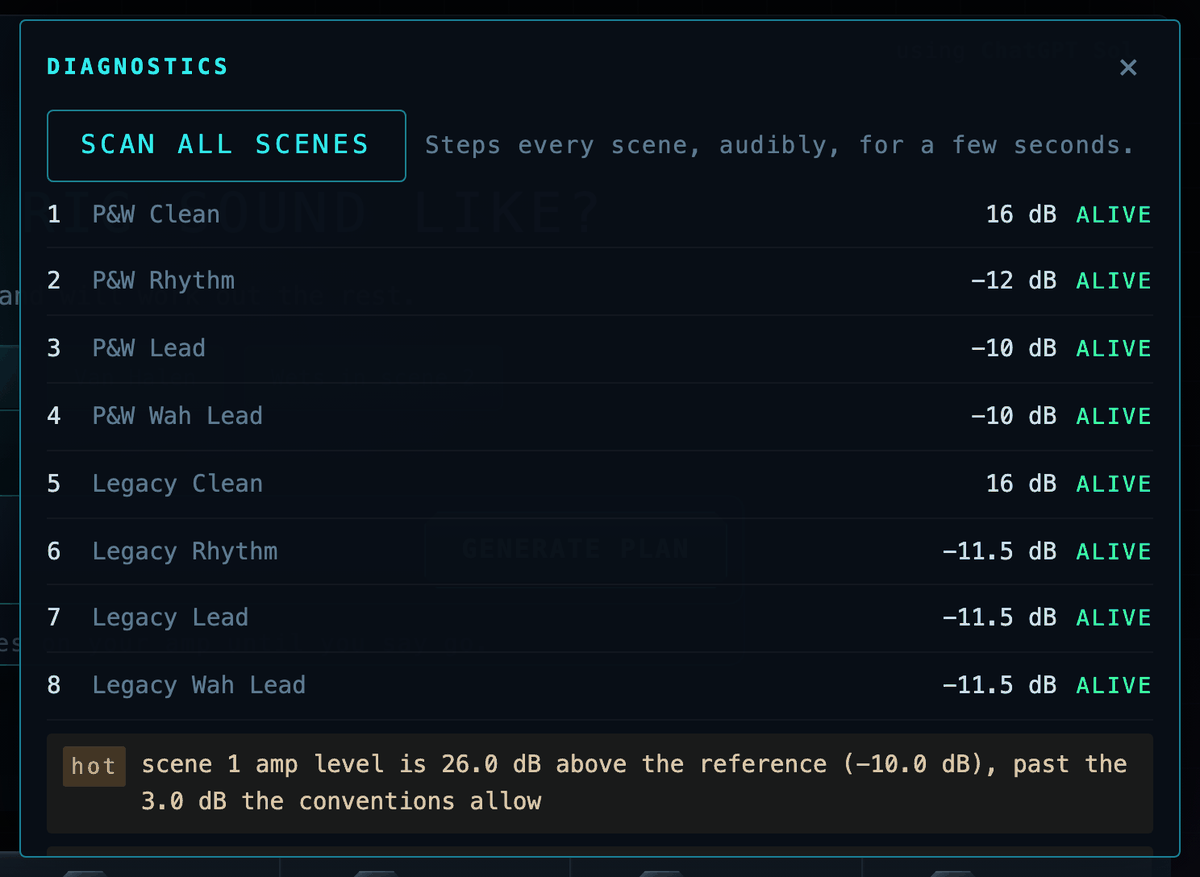
A health scan after every build flags a dead or duplicated scene the
moment it lands. Undo and A/B the FM9 itself does not have.
Install artist presets and cabs from Fractal's Gift of Tone. The catalog
shows only what your unit can take and says in one line when a pack needs
newer firmware; the zip is fetched from fractalaudio.com by your own app
at click time, checked against the catalogued sha256 before it is opened,
and cached by that hash. Nothing of Fractal's is mirrored here. "Sound
like Devin Townsend" checks the catalog first and offers the real pack; a
name with two matches asks which; a name with no pack says so plainly and
the build that follows is called an interpretation, never their preset.
The ARTISTS section in the Storage drawer installs a pack in one click:
cabs into free user-cab slots (moved, and the preset repointed, when the
pack's own slots are taken), the preset into a free store slot, and one
line saying where everything landed.
Paste an Axe-Change preset link and ToneCommand reads that one page, says
what it is, checks it is for your unit, and installs it the guarded way.
An installed pack then works as a reference: "difference between scene 1
and Devin's" reads the pack's preset off the unit and comes back to your
own with your unsaved edits put back (and says so if a block placed
unsaved could not be), and the planner's reference lists each installed
pack's amp, cab and drives, tagged with the artist and year, as facts
read from the file, never as the artist's words.
Measures, with a named baseline
The FM9 is a USB audio interface, so its output can be recorded and
measured instead of assumed. tools/measure.py <capture.wav> (or
/api/measure) answers band ratios over six regions, BS.1770 loudness,
stereo width and dynamics, after an acquisition check (silence, clipping,
dropout) that can make the whole measurement invalid. A number is
evidence next to the baseline it was measured against ("2.4 dB more bite
than your saved rhythm reference"), never a verdict on its own; the only
pass/fail rules are the relative scene-balance ones the rulebook states,
in config/sound_policy.json. SOUND CHECK, under the health scan, records
each scene through the USB path, measures it, and proposes the exact
OUTPUT_SCENEn move for anything the rules catch; the proposal goes
through the same Confirm as every plan, then the next SOUND CHECK verifies
it, three rounds at most, and says what is left. MATCH REFERENCE compares
the capture to a clip of your own (a song, a record) and proposes the amp
knob and direction for each band that differs, one step at a time.
it, three rounds at most, and says what is left.
Sign in to your own TONE3000 account from Settings (their documented
OAuth flow) and a recipe's capture is fetched under your entitlement;
anything your account cannot reach is a link, never a fetch through us.
Never sends behind your back
Read-back verification on every write, and a signal-path check so a preset is
never silently dead.
A "what will change" blast-radius preview before anything is sent, including
every other scene a channel-level change would move.
Gig lock: mid-set, only scene changes reach the amp.
Store only to slots you have marked disposable, and only after you confirm.
Bring your own AI: ChatGPT, Gemini, Grok, DeepSeek, Kimi, a subscription
you already pay for, a model on your own laptop, or the Claude CLI it finds on
its own.
03 · HUMANS IN COMMAND
Humans in command
Everyone is terrified the machines are going to take over. They already did.
For decades, YOU learned THEIR language just to operate them: menus,
parameters, MIDI, file formats, manuals. You adapted to the machine.
We reversed it.
With ToneCommand, the machine learns your language.
"Build me a crushing Drop C rhythm."
And it figures out how to make that happen on the hardware. We're done
speaking machine.
The machines speak human now. Humans in command.
That is not a slogan. It is the constraint every other decision here bends to.
A language model proposes. It never sends. There is no autonomous mode, no
"just do it" flag, and no path from a sentence to your hardware that does not
pass through a human reading the exact list of parameter changes first.
The tool refuses more than it does: it refuses to guess a value it cannot
ground, to name gear it has not verified, to claim a pedal sweep works when
only your foot can prove it, and to store to any preset slot you have not
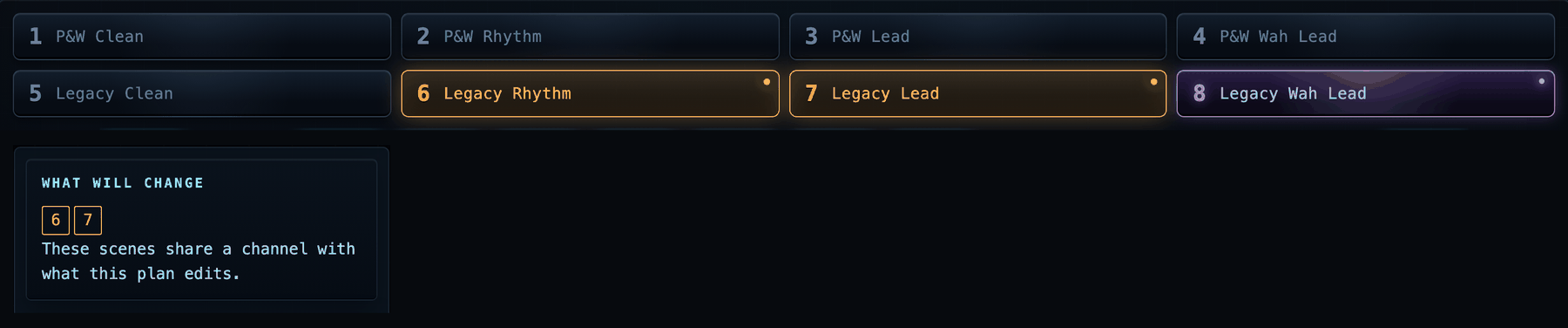
explicitly marked disposable. And before anything is sent, it shows the blast
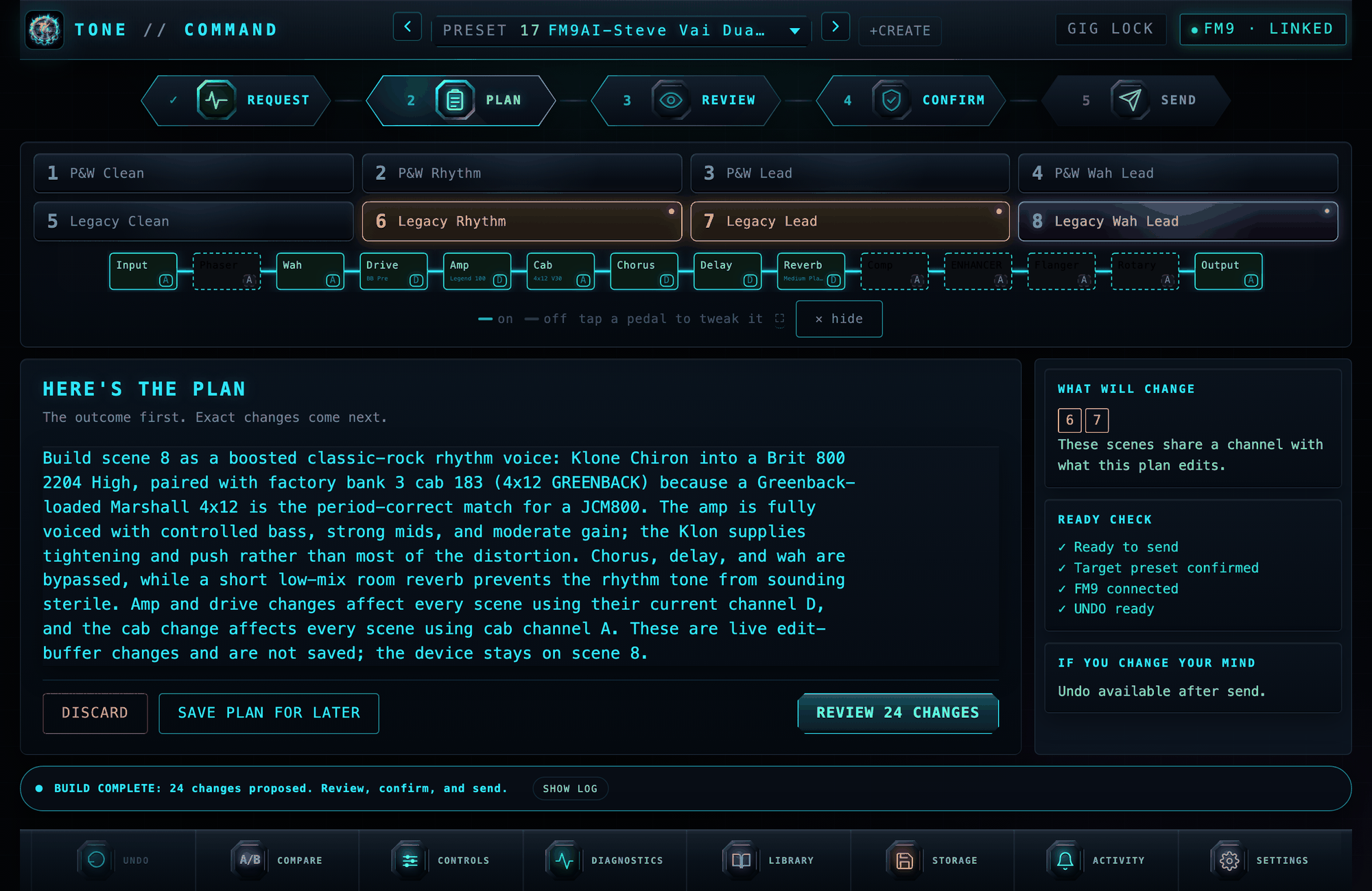
radius: FM9 parameters live on the channel, not the scene, so every other
scene a change would quietly move lights up amber and says WILL CHANGE, while
there is still time to not do it.
Every verification in this project ends the same way:
ears: pending, always.
A machine reading a wire can prove the signal is alive, the levels are sane
and the write landed. It cannot tell you the tone is good. That judgement was
never ours to take, and nothing here will pretend otherwise.
04 · WHAT YOU CAN SAY
What you can say
Every line here is a real request the planner turns into concrete, verified
parameter changes, shown to you before anything is sent.
Build a rig
"build a modern metalcore rig in drop C: big ambient clean, tight chug rhythm, a lead that sings over the mix, and a heavier breakdown"
"an 80s hard-rock tribute: big loud chorus cleans, a boosted JCM800 crunch, and a soaring lead"
"give me a Van Halen Balance era tone with the flanger on the expression pedal"
Voice and tweak
"a Klon into a JCM800 with a greenback 4x12"
"tighten the gate for drop C and bump the presence slightly"
"make scene 1 a dry crunch rhythm and keep the wets in scene 2"
"put a 4x12 Recto V30 on the rhythm channel"
Build from a video or a conversation
"build the lead tone from this rig rundown: https://youtube.com/watch?v=..."
"here is a forum thread about a worship rig, build me scene 1 from it: "
paste a whole chat about someone's tone and say "make this on my FM9"
Borrow from artists you own
"take the gain stage from BT Marco Sfogli and the delay from the Andy Timmons tone"
"make my delay like BT Steve Lukather's, matched per scene"
"clone the Periphery Misha preset into slot 22, but pull the reverb from the Majesty one"
Put it under your feet
"put global volume on Pedal 1 and wah on Pedal 2"
"delay and reverb mix on Pedal 2 so I can swell into the chorus"
"add a subtle octave-down layer like a POG under the lead"
05 · THE INTERFACE
The interface
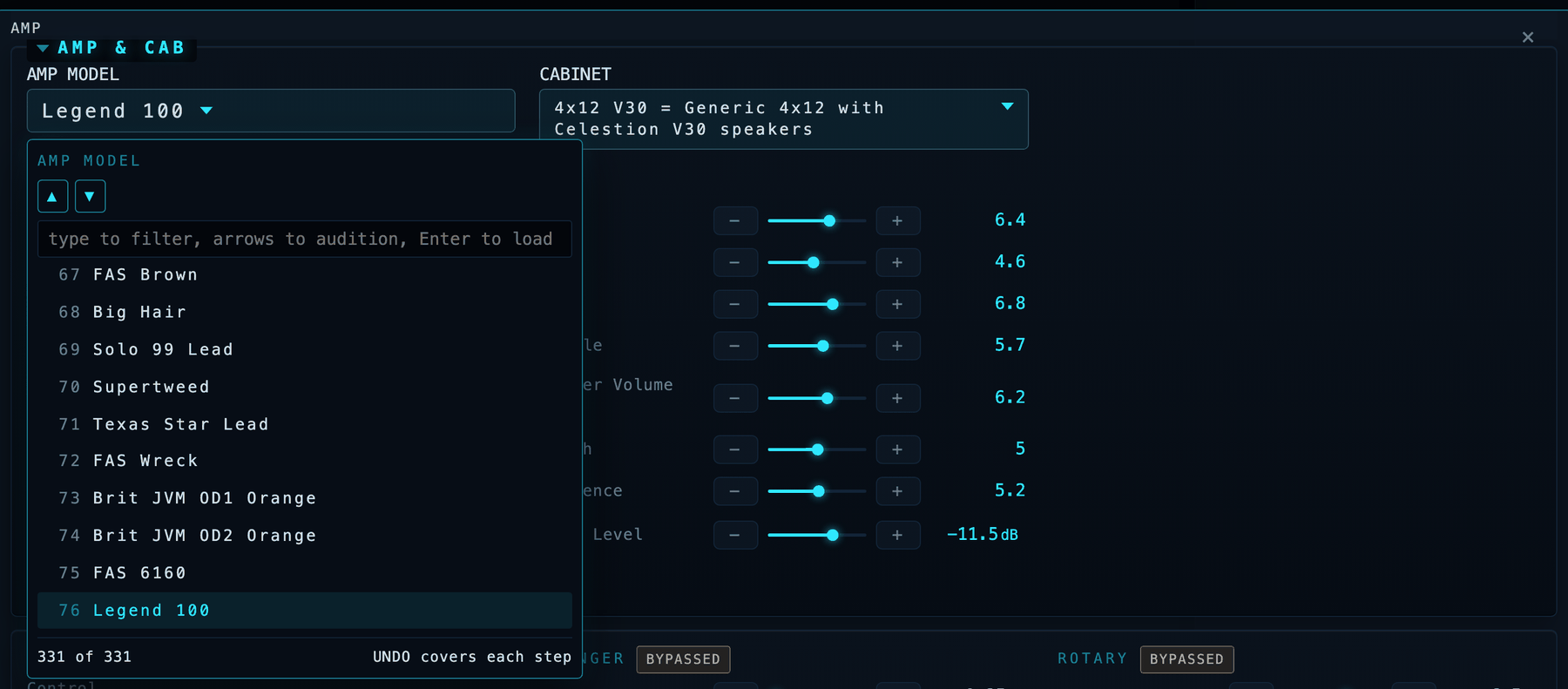
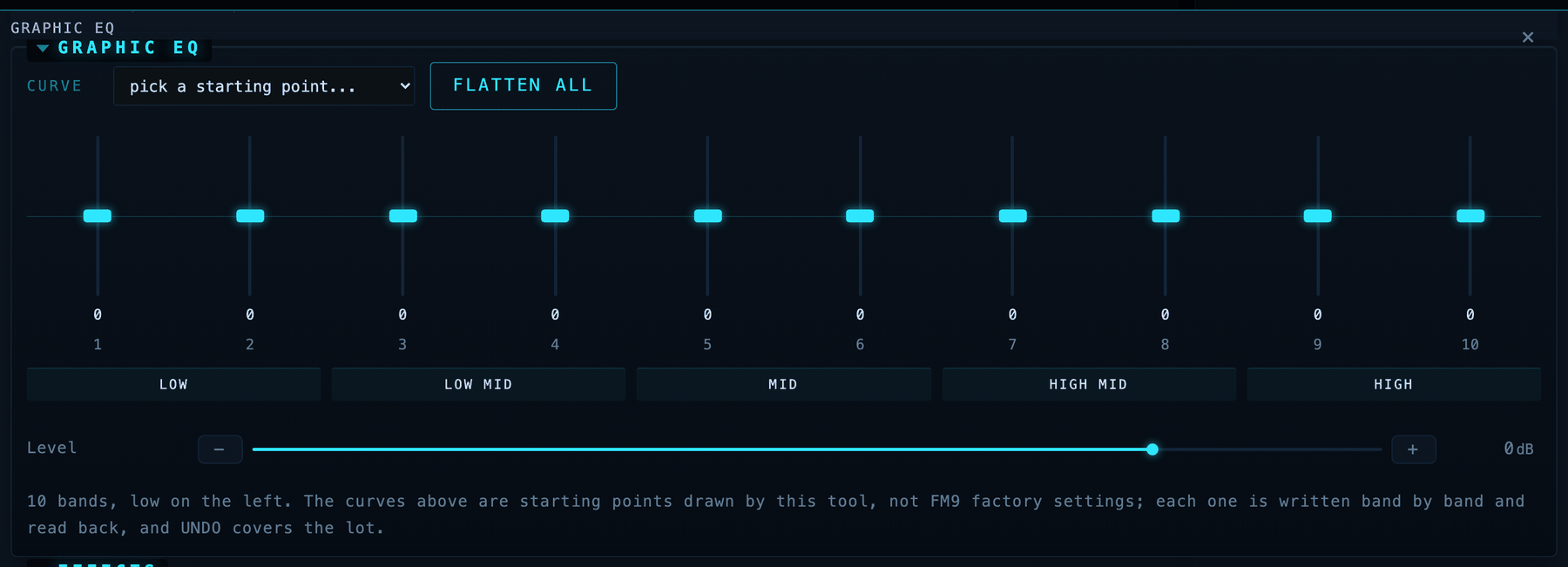
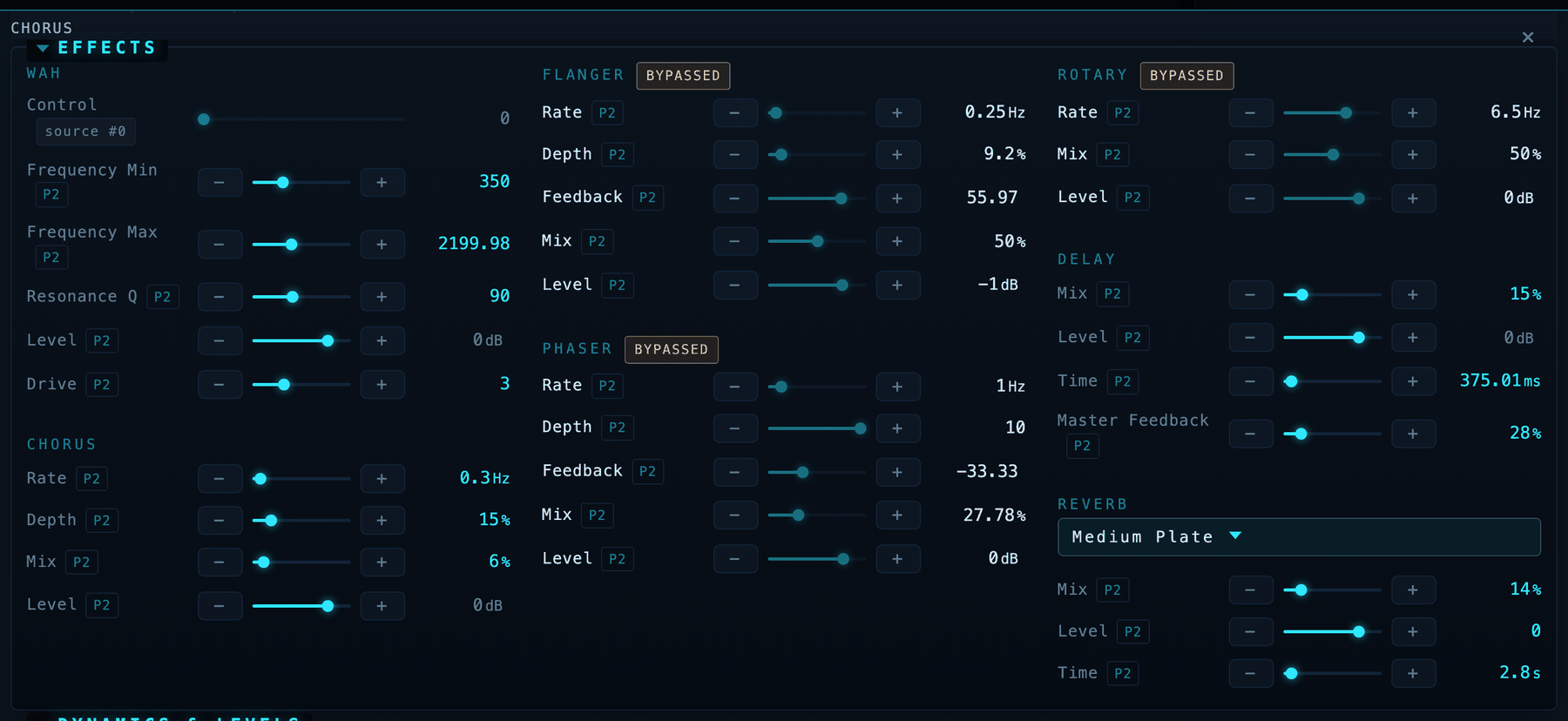
Auditioning amp models: a filtered list stepped with the arrow keysAuditioning cabinets: the Legacy bank filtered to V30 cabs as you type, 15 of 189, with what each cab actually isThe graphic EQ: ten vertical faders over a range strip, with a curve picker and FLATTEN ALLBypassed blocks badged, a modifier-driven parameter naming its source, and P2 buttons on every bindable rowTwo scenes lit amber beside the one you are standing in, and the WHAT WILL CHANGE card naming themA preset health scan: every scene alive, levels listed, one flagged hot
Everything above is live from a connected FM9; nothing on this page is a
mock-up. The full tour is in docs/INTERFACE.md. The
short version:
The routing grid is your actual routing grid, cables and all, with the
live path lit. Click a block to bypass it, click its letter to change
channel.
Audition amps and cabs by typing, not by turning a knob through 1024
entries. 331 amps and 2,237 cabs, searchable by what the gear really is.
A graphic EQ that looks like one: faders standing up, seven starting
curves, one click back to flat.
Honest panels: bypassed blocks are badged, pedal-driven parameters name
what drives them, and "verified" is never said about a change you cannot
hear.
Blast radius before every send, a health scan that finds dead and
duplicated scenes, undo and A/B the FM9 itself does not have, and
saving with the safety catch on: only to slots you listed, never by
surprise.
06 · HOW IT WORKS
How it works
flowchart LR
    U["Your words"] --> P["Planner<br/>your AI + facts-only<br/>grounding sidecars"]
    P --> V["Safety layer<br/>validation, confirmation,<br/>preset-pinned plans,<br/>store whitelist"]
    V -- "approved plan" --> A["Device adapter<br/>contract"]
    A --> D["FM9 device layer<br/>SysEx over USB MIDI"]
    A --> S["Simulator<br/>models the real quirks"]
    D -- "read-back verify" --> V
The planner never touches the wire. It emits a plan in a closed action
vocabulary; the safety layer validates every action against grounded catalogs
(all 331 amps, 86 drives and 2,235 cab IRs mapped to the real gear they
capture, citations and all), pins the plan to the preset it was computed for,
and requires your confirmation. Only then does the device layer transmit, and
every write is verified by reading the unit back. The simulator sits behind
the same adapter contract, so the whole test suite runs without an FM9
attached (ARCHITECTURE.md).
Building it meant decoding parts of the FM9 editor protocol nobody had
written down. Those findings are free to any Fractal tool builder in
docs/PROTOCOL-CONTRIBUTIONS.md, and the
community work this stands on is credited in
docs/CREDITS.md.
07 · SAFETY
Safety
Rule zero: this tool can never brick a device. It touches only user data,
every operation is recoverable by a power cycle and preset reselect, and the
transport layer refuses to send any message type outside its decoded,
verified surface: firmware and bootloader operations are structurally
unreachable, on every device, forever.
Edit-buffer by default. Changes go where front-panel knob turns go;
re-selecting the preset discards everything.
Confirm before send, and plans are pinned to the preset they were
computed against.
Store is disabled until YOU enable it, via
TONECOMMAND_STORE_SLOTS=133-148 (wire numbers; the editor shows 134-149).
Nobody but you knows what lives in your banks, so there is no default.
IR installs are disabled until YOU enable them, via
TONECOMMAND_CAB_SLOTS (see config/README.md for the scratch-slot
convention). Auditioning a cab never writes a slot: it is an edit-buffer
selection that is put back when you are done.
Never touches firmware, system settings, or global setup.
Back up first anyway. Run a full Fractal-Bot backup before using any
third-party MIDI tool, this one included.
The IK Multimedia ToneX pedal is on the same capture contract, read-only for
now: its 128 programs are listed by name and category from the pedal's own
dumps, and nothing is written to it until the upload path is decoded (#27).
08 · NEXT: NAM CAPTURES
Next: NAM captures
Fractal showed a NAM (Neural Amp Modeler) block running on the Axe-Fx III on
2026-09-17: captures in the open format the whole community trades, playing on
Fractal hardware. ToneCommand has treated captures as a tone source since
August (a capture as the sound a build aims for, captures as real gear facts,
capture-capable devices in the plan); the piece that was missing was the FM9
playing one. The plan for that half is written and public as Epic I
(#140). None of it has
shipped yet, and Fractal has not said when the FM9 gets the block.
The product line: you never see a .nam file, a manager app, sysex, channels
or slot numbers. One sentence in, a leveled, cab-paired, audited preset out,
stored on the unit and read back to prove it landed.
What you will be able to say
Give me that captured Friedman on the lead scene.
Swap the amp in scene 3 for a real capture of it, keep everything else.
Here are my six Mesa captures, spread them across scenes 3 to 8.
Use my own JCM800 capture for rhythm and the factory model for lead, so I can hear the difference.
Make this a capture-based preset for drop C, tighter low end.
What captures are on my rig, and which presets use them?
Compare my captured 5150 against the built-in one on the same scene.
Share this preset with the band, and point them at the capture instead of sending the file.
What it says when it cannot
No NAM block on this unit's firmware yet.
That capture is too heavy for the FM9.
Gig lock is on, nothing changes tonight.
The rules do not change for a capture: nothing is written to the unit blind,
every write is read back, and the tone check runs on a capture the same way it
runs on a model.
The first piece of that plan is in: the adapter contract carries a capture-slot
primitive (fm9/adapter.py, gate plays_captures, sub-Protocol
CaptureSlots: capabilities, list, install, remove), so the intake, level and
cab-pairing work is written once and each device only maps its own slots. The
simulator implements it fully in memory (whitelist TONECOMMAND_NAM_SLOTS,
same rule as user cabs and stores: empty means disabled; an occupied slot a
stored preset references is never overwritten or removed). The FM9 and the
HeadRush declare that they play no captures today, in one line, and
conformance() refuses any device that claims the gate without the methods.
Bring your own captures: drop one .nam file, several, or a folder on the
command bar and each comes back as one honest line; a set of captures of one
amp maps to channels A to D, or to scenes when there are more than four, in
gain order when the files say their tone type. Duplicates are recognised and
skipped. When a capture cannot be used (none suitable, too heavy, a unit
without NAM support, the gig lock, a read-back that does not match), the
answer is one line saying what was done instead; nothing is retried blindly.
09 · SUPPORT
Support
ToneCommand is free and always will be. If it saved you an evening of
preset fiddling, you can buy the maintainer a coffee
under his stage name, Shieldbearer. Or wear the thing: the emblem is on a
tee and a
performance jersey,
both carrying the line at the top of this page, which was written for the
shirt before it described the software.
Windows (the test suite runs on Windows in CI; needs Fractal's USB
driver, the same one FM9-Edit uses, before the FM9's MIDI ports appear, and
version 1.5.3 or newer):
Python 3.11 or newer on every platform, no compiler needed: on 3.11 and
3.12 the MIDI binding is python-rtmidi, and from 3.13 it is supriya-midi,
which ships prebuilt wheels to 3.14 (fm9/midi_transport.py picks the
binding; TONECOMMAND_MIDI_BACKEND forces one). Both passed the same
hardware pass on an FM9 connected to a Mac, issue #172. On Windows, 3.12 is
still the choice proven on a connected unit.
On Windows, or never used a terminal before? Follow the
step-by-step Windows guide
(docs/WINDOWS.md) instead. It assumes nothing, needs no
git, and covers what to do when something goes wrong. One link to share
with anyone: tonecommand.com/windows
Linux (untested, expected to work; the MIDI library builds against ALSA, so
install its headers first):
A signed-in Claude Code CLI is found on its own; any other AI is a chip in
the gear menu (docs/AI-BACKENDS.md). To build tones
from YouTube videos, add pip install -e ".[video]" and
brew install ffmpeg (a system dependency; pip cannot install it); details,
testing and FM9-Edit coexistence notes are in docs/SETUP.md.